Hack: Netvibes with Firefox 2.0
08 11 06 - 22:01 - Bookmark this post
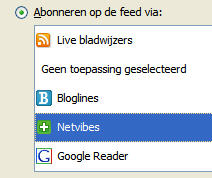 If you use Firefox 2.0 (and why shouldn't you?) and Netvibes you may have already found out that the default Netvibes extension is not working with Firefox 2.0. Which basically bums me out because every now and again it can be really handy to quicky add some feed to my Netvibes tab. Also, in the Livefeeds-settings from Firefox, you can't add the option to subscribe with Netvibes. So it's good to see there is a little hack to add Netvibes to the Livefeeds settings. With it, you can add any webfeed to Netvibes with one simple click. The article describes thesteps in FF 2.0 Beta but they also work in the final version. For me, the clean way didn't work, the "ugly" way did.
- Open a Tab and type in 'about:config' in the address bar.
- Filter the list by the words 'contentHandlers'. This should list the Google, Yahoo and Bloglines feed-readers.
- You will need to create new entries for Netvibes.
- To create a new entry right click the window and select 'New > String'.
- For the first string enter 'browser.contentHandlers.types.#.title' as the preference name and 'Netvibes' as the string value. '#' is the next biggest number for the feed contentHandlers. In my case it was 6.
- For the second string enter 'browser.contentHandlers.types.#.type' as the preference name and 'application/vnd.mozilla.maybe.feed' as the string value.
- For the third string enter 'browser.contentHandlers.types.#.uri' as the preference name and 'http://www.netvibes.com/subscribe.php?url=%s' as the string value, '%s' here is replaced by Firefox as the URL of the RSS/ATOM feed when it subscribes to Netvibes.
- Restart Firefox and check if 'Netvibes' is listed as a feed when you subscribe to an online feed by choosing 'Bookmarks > Subscribe to this Feed'.
My Way: Netvibes with Firefox 2.0 Beta
Update: In the comments, Franck Mahon tells us about the Netvibes team who have created a one-click solution. Check it out on their blog
Like this article? Subscribe to the RSS feed!
Thanks for sharing this with your visitors.
TO do it a bit easier we have created a little code which will do this automaticaly. YOu will only have to click once. More info here: http://blog.netvibes.com/?2006/10/25/83-..
And our QA team is right now testing the new version of the firefox extension which if compatible with Firefox 2…
Hope you’ll enjoy it.
Franck Mahon - 09 11 06 - 00:32
Franck: Thanks for the update. The solution Netvibes provide is way more elegant and less of a “hack” so perhaps a more safer way for most people. Thank you!
Frank Meeuwsen - 09 11 06 - 07:41
Test.. Test..
Bob - 14 11 06 - 22:02
more test test
Frank Meeuwsen - 15 11 06 - 20:29
Thanks for sharing this useful tip! I’ve always wanted to use firefox for netvibes.
Mike - 14 01 08 - 08:24
Since this weblog is no longer active, comments are disabled too. Please use a trackback from your own weblog if you want to comment on an article. Thank you.
Frank Meeuwsen


Last Comments
Gemini (Advanced Workflow…): This is an excellent document. I wan…Fun and my diet (The next action: …): Nice to meet you, I’m from Japan. G…
free online flash… (Vote for the best…): Congratulations a good site!!! Thank…
Scott STEPHEN (Join the GTD-Feed…): I have a blog ("O&A Coaching":www.oe…
Jan G (5 GTD systems I s…): Hi. I have both ThinkingRock 2 and M…
Pawel (Nozbe makes me bl…): After three days of testing nozbe.co…
Kevin Crenshaw (Join the GTD-Feed…): Priacta would like an invitation, pl…
Scott Carlson (AutoHotkey and Th…): I have a similiar script to Luke, bu…
Tayla (How to make copy …): тαу.ℓα (: ιѕ вσяє∂
Emil (Enlarge your text…): dsf