MyTicklerFile.com...What's the use?
24 09 05 - 22:11 - Bookmark this post
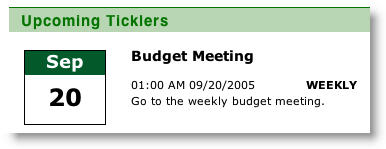 MyTicklerfile.com is a new webbased tool for creating appointments and recurring tasks. As they say for themselves it can be used to implement Getting Things Done in your own way. But I have my doubts. First off, thanks to the buzzword-friendly Web 2.0 features of Ajax and tags it has some real desktop-like, rich experience to it. This really enhances the way to work with it. But what bothers me is the underlying principle. This is just for ticklers, reminders. You can use your emailclient to send reminders to your Myticklerfile-account and you can get ticklers through email. But I think to myself: Why have an online application for it? And it’s just one piece of the puzzle. What about your Next Actions? What about filing your information? It really brings back memories of my Nine Inboxes problem, where all the information was scattered over mailprograms, websites, offline folders and desktop apps. When you use MTF, I get the feeling you have *another* website you have to keep track off, manage, update etc. I keep coming back to using some sort of dashboard-mechanism where I can get an horizontal overview of my daily to-do’s, appointments, tasks etc. MS Outlook so far can give me that overview. In combination with the GTD Outlook Addin I feel I am really getting things done already. Still not there yet (black belt? Forget it… ) but at least I am taking little steps instead of standing still.
Conclusion: If you just need some tool to keep track of your reminders and appointments, Myticklerfile.com can be the webtool for you. But if you are serious about your GTD, I feel it is too light.
First, I would like to thank you for reviewing My Tickler File (MTF). I read your comments and truly appreciate your thoughts. However, while Outlook affords you the ability to create reminders, review your tasks, to-do’s, appointments, etc. it only does this locally. Also, this information is stored locally which means there is potential for data to be lost (unless you are constantly backing your machine up…which most people do not do effectively.) What MTF allows you to do is create and access these ticklers remotely, whereas with Outlook, if you are away from your machine…you are away from your ticklers! Also, by storing ticklers remotely a user now has the comfort of knowing that their data is secured and stored on servers that are backed up routinely.
Nevertheless, we are committed to making this application as useful as possible and will continue to make updates and add features that enhance the usability of the product. You mentioned that you felt that MTF was too light for GTD...what features do you suggest will make this product more effective in your opinion?
Thanks again,
My Tickler File Team
http://www.myticklerfile.com
Marion Newman () (URL) - 27 09 05 - 02:06






Last Comments
Frank Meeuwsen (The Ultimate GTD …): Vic, thanks for the link. Excellent …vic (The Ultimate GTD …): Hi, I see you like one-page aggregat…
Alex (Just a thought on…): Frank, I wanted to answer to your la…
Frank Meeuwsen (Just a thought on…): Alex, you are absolutely right. I st…
Alex (Just a thought on…): Completely unrelated to the content …
Ian Hunter (Just a thought on…): Couldn’t you accomplish EXACTLY this …
punkey (Just a thought on…): Dean & Jeff: Excellent tip for the ex…
Jim Clark (Just a thought on…): A friend recently showed me this fre…
Jeroen Sangers (Just a thought on…): I also don’t keep my browser open, an…
JeffH (Just a thought on…): Firefox has an Add-in called “Morning…