Zoom your textarea!
19 05 05 - 08:29 - Bookmark this post
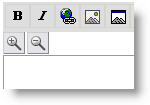 Taken shamelessly from the excellent Lifehacker-blog:
The Zoom Textarea user script lets you enlarge textareas on any web page for more glorious room to type – so handy for writing forum posts, weblog comments or posts, and web-based email.
The Zoom Textarea user script requires the Firefox Greasemonkey extension (at least version 0.3.) If you’re a Firefox user without Greasemonkey, here’s how to install the script:
- In Firefox, click “Install Greasemonkey” from here. Be sure to allow “greasemonkey.mozdev.org” to install software in your browser.
- Restart Firefox.
- Right click on this link: zoomtextarea.user.js.
- Click “Install User Script.” Press OK.
- Refresh any page with a text area on it, and you will see a zoom in and zoom out button above it.
If you spend a good part of your day typing into web pages, Zoom Textarea will quickly become indispensable for your writable web.
Case study: Zoom Textarea [Dive into Greasemonkey]
Update: It also makes the font in the textarea itself bigger, so the effect is not that great….hmmm..
Try this one—it lets you resize textareas as if they were windows (drag the corner or side). Works great – http://www.extensionsmirror.nl/index.php..
Marcus - 04 06 05 - 13:35



Last Comments
Frank Meeuwsen (The voice of a ge…): Thanks for the comments. @Jason I ne…Jason (The voice of a ge…): Yeah, man. Kerouac’s a great inspir…
jim (The voice of a ge…): Denizens of the Darkness Jack Keroua…
Dan (The voice of a ge…): Thanks for honoring such a great ame…
Kaj (Get the Most Out …): There is also a GTD firefox addon fo…
Wyatt (Accomplice, is it…): I installed Accomplice on my U3 usin…
Kristina Richards… (Blog Action Day: …): Everyone can make a difference! If y…
Heather (How do you start …): @Frank: I do a regular back-up of ev…
Frank Meeuwsen (How do you start …): @Dick and Heather: Do you also keep …
Heather (How do you start …): Rebecca, like Dick, I use TR on tw…