Three little time-savers!
10 05 05 - 11:36 - Bookmark this post
Hey all! We’re halfway through the moving process from the south of the Netherlands to the middle. That is, we’ve painted the new house (check some pics here) and recoated the floor (is that how you call that?) This Friday, we’ll be moving our stuff from house A to house B and to put first things first: The network cable and Wifi-router are on top of the stack!
Anyway, I would like to talk a little about three time-saving plug ins/apps I am using right now to make my life on the web a wee-little easier.
Targetalert
Don’t you hate it when you click a link in Firefox and darn…it’s a PDF! Or a mailto-link. Well fear no more! Because Targetalert let’s you tweak these links
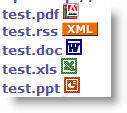
Now you can see beforehand if the link is for instance a PDF-file. If so, make sure you have installed…
PDF Download
This nifty little gem gives you a couple of options: Download the PDF, view it in a new tab or view it as HTML. The last option is a bit buggy, but the rest works fine!

Foldercache
Foldercache is a nice shareware-tool I actually bought because it saves me a lot of headaches browsing to the right folder on our network. Let me explain: We work on a lot of projects which all have their own client and project folder on our network. I work on 5-10 projects a day (depending the size of projects). During a day I have to go to that particular network folder a lot of times. But I also would like to check some music or find some programs I downloaded. With Foldercache, you will have an extra icon in your system tray which gives you a popupscreen of your last visited folders and your favorite folders. The application has a lot of tweaking power for the way the folders are shown, which drives should be in- or excluded when offline (read: off the network) and a deletable history of visited folders. It sure is a time saver for me to just add a new project folder to the list and delete old ones and I’m ready to go.
Also, it nests itself in various Windows-dialogs, so Saving or Opening in the right folder is a breeze!

I hope these little timesavers will help you do your work faster. Do you have some interesting extensions or apps you use? Let me know in the comments!
In the U.S., you may have “refinished” the floor. I don’t see a link to photos, so I’m not sure what your floors look like.
Robert - 11 05 05 - 18:52
e
e - - :



Last Comments
Frank Meeuwsen (The voice of a ge…): Thanks for the comments. @Jason I ne…Jason (The voice of a ge…): Yeah, man. Kerouac’s a great inspir…
jim (The voice of a ge…): Denizens of the Darkness Jack Keroua…
Dan (The voice of a ge…): Thanks for honoring such a great ame…
Kaj (Get the Most Out …): There is also a GTD firefox addon fo…
Wyatt (Accomplice, is it…): I installed Accomplice on my U3 usin…
Kristina Richards… (Blog Action Day: …): Everyone can make a difference! If y…
Heather (How do you start …): @Frank: I do a regular back-up of ev…
Frank Meeuwsen (How do you start …): @Dick and Heather: Do you also keep …
Heather (How do you start …): Rebecca, like Dick, I use TR on tw…